
Cowork for visual thinking

See what you're thinking.

Talk an idea through and watch it take shape — diagrams and Markdown that move at the speed of thought.

Built around portable diagram workflows

MermaidMarkdownGitHubOpenRouterOpenAIGeminiSVGPNGDocs
Key Features

More structure for the messy middle of technical thinking.

Always editableSyntax awareReady to ship
Always editable

A diagram workspace that stays close to the source.

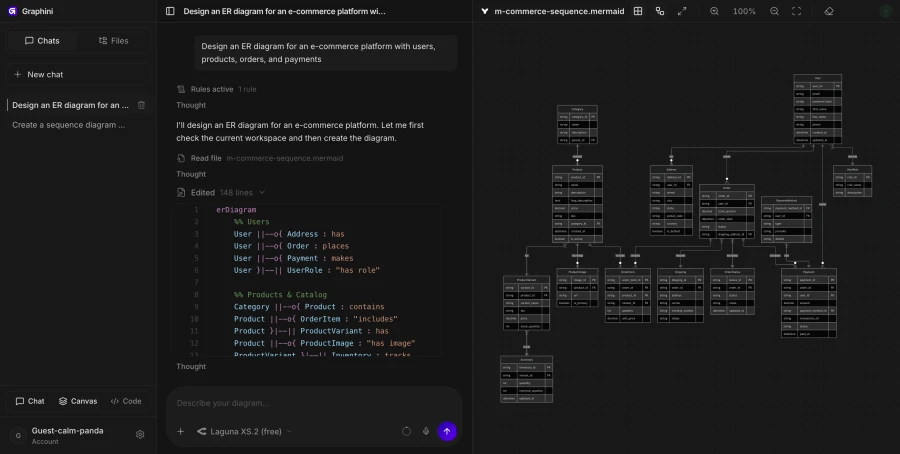
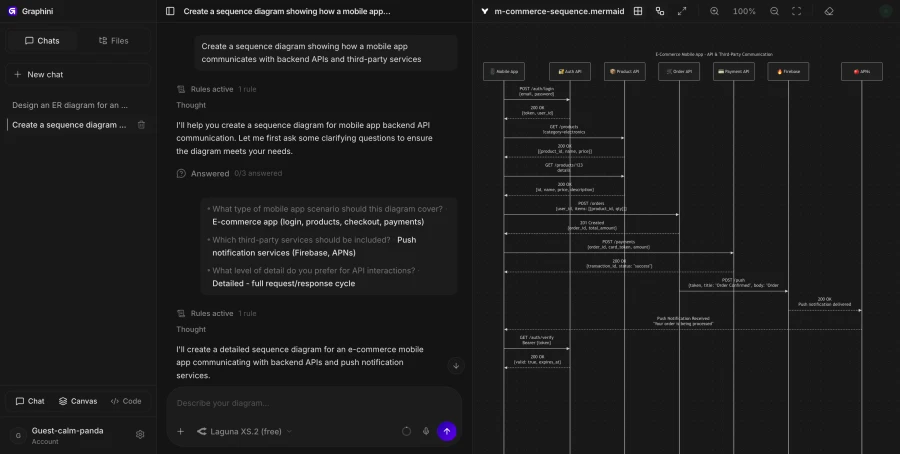
Graphini keeps chat, Mermaid, rendered canvas, and document notes together so a system sketch can become handoff material without changing tools.

  • Canvas, code, document, and chat in one workspace
  • Readable Mermaid that can be copied or versioned
Syntax aware

Repair broken diagrams without flattening intent.

When Mermaid gets noisy, the assistant can correct syntax and improve structure while preserving the architecture you already described.

  • Error-aware fixes for Mermaid output
  • Flowcharts, sequence diagrams, ERDs, timelines, and C4-style maps
Ready to ship

Export the work into the places decisions happen.

Send clean assets into project docs, pull requests, architecture reviews, incident reports, and planning notes.

  • SVG, PNG, and source export
  • Useful for architecture, API, data, and incident documentation
5 diagram formats tuned for technical teams
4 workspace surfaces connected by context
0 lock-in: Mermaid stays plain text
1 place to prompt, edit, repair, and export
Essential Features

Everything a diagramming workspace owes the engineer using it.

Mermaid-native rendering

Diagrams render straight from Mermaid source so the canvas always matches the code beside it.

Syntax-aware repair

When the parser breaks, the assistant patches the diagram without flattening the structure you described.

Live canvas preview

Pan, zoom, and inspect the diagram while it updates as the conversation moves.

Portable export

Ship SVG, PNG, and Mermaid source into docs, PRs, and review tools without a re-render step.

Prompt to handoff

Take a rough note from a ticket and leave with an artifact a teammate can read on their own.

Essential Workflow

From prompt to diagram asset without leaving the page.

Prompt

Describe rough notes, tickets, or pasted architecture context.

Mermaid

Keep diagrams inspectable, portable, and easy to review.

Repair

Fix syntax, layout, labels, and missing edges without starting over.

Export

Ship SVG, PNG, and Mermaid source into docs, PRs, or issues.

Why Graphini

Built for the way technical thinking actually flows.

Context-fresh

Capture system thinking the moment it lands, before the diagram drifts from the conversation.

Plain Mermaid

Diagrams stay as plain text — diff-friendly, copy-friendly, version-friendly.

Repair-first

Broken syntax and odd layouts get corrected without losing the structure you described.

Multi-format

Sequence flows, flowcharts, ERDs, C4 maps, and incident timelines from one prompt surface.

Portable export

SVG, PNG, and source ship into docs, PRs, and review tools without re-rendering.

Stays inspectable

Code, canvas, and chat sit side-by-side so the diagram is never a black box.

Integration & Tools

Use Graphini where technical work already happens.

MermaidMarkdownGitHubOpenRouterOpenAIGeminiSVGPNGDocs
FAQ

Small answers before you open the workspace.

Is the output editable?

Yes. Graphini keeps Mermaid source visible, so diagrams can be edited, copied, reviewed, and versioned.

Can it fix Mermaid errors?

Yes. The workspace has a syntax-aware repair loop for broken diagrams and layout issues.

Is this only for architecture diagrams?

No. It is useful for system maps, sequence flows, incident timelines, ERDs, and documentation diagrams.

Start with a messy thought. Leave with a diagram you can ship.

The diagram can get cleaner as your understanding gets sharper.

Create a diagram